Can I be honest? I almost didn't write this post because by the time you read it, something will probably have changed.
That's the part nobody talks about. You finally get comfortable with one AI tool, and then there's a new version. Or a new product. Or the thing you just learned got renamed, merged, or replaced entirely. It's exhausting. And if you're a small business owner trying to figure out which tool to actually use, it can feel like the ground keeps shifting under your feet.
I get it. I'm in this space every day and even I have to pause sometimes and ask: wait, what changed?
So when a client asked me this week about the three different versions of Claude, I realized this is a conversation a lot of people need. Not a technical breakdown. Just a clear, honest answer to the question you're probably asking too:
Which one do I actually need?
Here's what I know right now. And if something changes, I'll update this page, because that's what a good resource does.
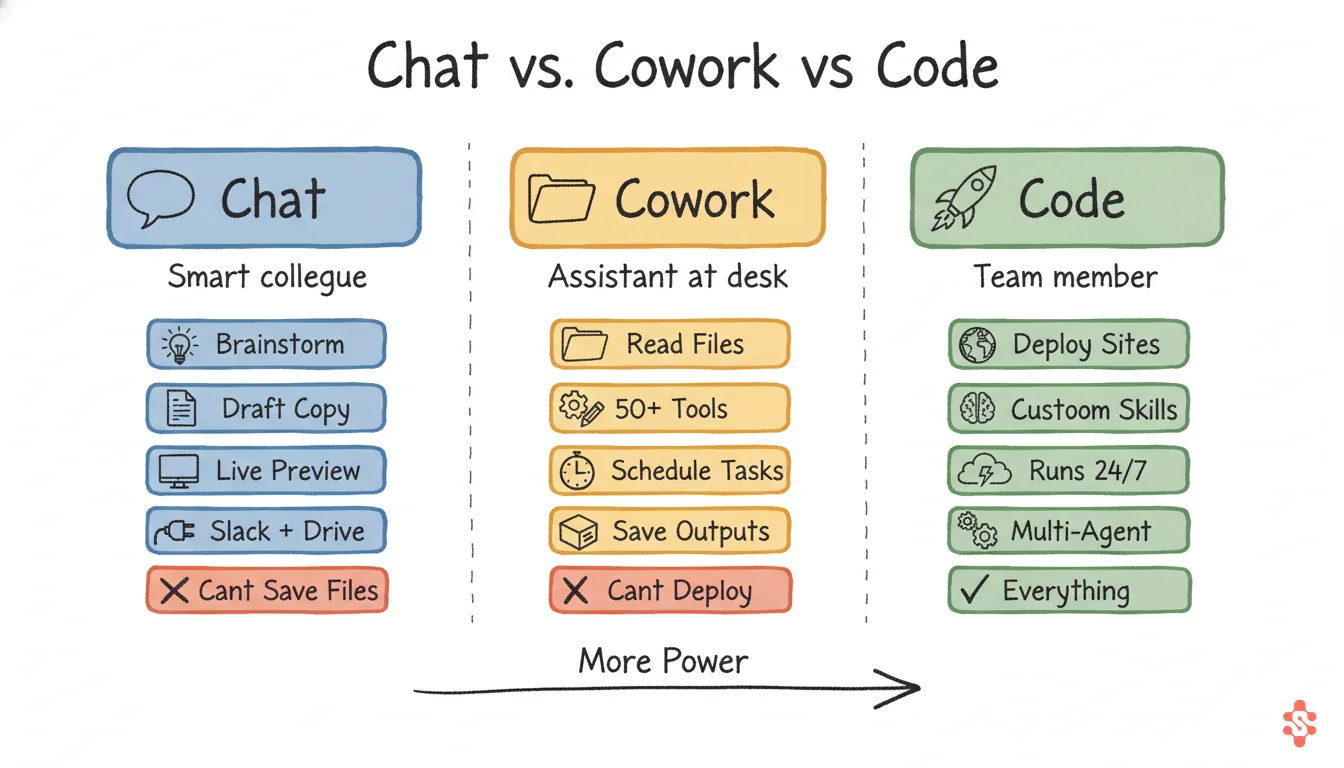
The Big Picture
Chat
Ask, Build, Preview
Example: "Build me a landing page for my new workshop" — and it creates one you can see and interact with, right in the chat
Cowork
Access, Automate, Connect
Example: "Every morning at 8am, check my calendar and Slack, then write me a daily briefing"
Code
Build, Deploy, Operate
Example: "Build my website, deploy it, then manage my content, clients, and marketing from one place"
The Comparison
The old way to compare these would be a list of features. But you don't care about features. You care about what you can actually get done. So here's the question: can it do this for my business?
Important: These build on each other. Everything Chat can do, Cowork can also do. Everything Cowork can do, Code can also do. You're not losing anything by moving up, you're only gaining.
The question is: what can only be done at each level? Let me walk through each one.
Claude Chat: The Starting Point
This is the free version at claude.ai. Most people start here, and honestly, it's more powerful than people realize. (Here's how to create a free account if you don't have one yet.)
What it can actually do:
You can ask Claude to build you a full landing page, and it will. Right there in the chat, an interactive preview pops up in a sidebar (Anthropic calls these "Artifacts"). You can click around, see how it looks, ask for changes, and iterate until it's right. Same thing with calculators, quizzes, trackers, forms — it builds them live.
It also connects to tools you already use. Through "Connectors," Chat can search your Slack messages, pull from Google Drive, read your Gmail. You don't have to copy-paste everything into the chat anymore. It can go get the context it needs.
Real examples:
- "Build me a workshop registration page with a countdown timer" — it builds one you can preview instantly
- "Search my Slack for what my team said about the Q2 launch" — it pulls the relevant messages
- "Summarize this 30-page contract and flag anything I should worry about" — handles it in seconds
The catch: Everything it builds lives in that chat window. You can copy the code, but there's no "publish" button. It can read your Slack, but it can't send a message for you. It's a really powerful sandbox, but it's still a sandbox.
Think of it like: A brilliant colleague with a whiteboard. They can sketch out anything you describe, and you can see exactly what it would look like. But the whiteboard isn't connected to the real world.
Claude Cowork: The Desktop Assistant
Cowork runs inside the Claude Desktop app. The big jump: it can access the files on your computer, connect to 50+ business tools, and run tasks on a schedule.
What it can actually do:
Cowork can read and write files on your machine. Need it to organize a messy folder of client documents? It can do that. Need it to pull data from a spreadsheet and turn it into a report? Done. It also connects to Slack, Google Drive, Gmail, Asana, Notion, Figma, HubSpot, and dozens more — not just to read, but to interact.
The scheduled tasks feature is where it starts to feel like a real assistant. You can tell Cowork: "Every Monday at 8am, check my calendar for the week, look at my Asana tasks, and write me a briefing." And it does. Every Monday. Automatically.
One thing to know: Scheduled tasks in Cowork only run when your computer is awake and the Claude Desktop app is open. If your laptop is closed at 8am Monday, it'll catch up when you open it, but it's not running in the cloud while you sleep. (Claude Code recently launched cloud-based scheduling that runs even when your computer is off — more on that below.)
Real examples:
- "Organize my Downloads folder — sort everything from the last month into folders by type" — it reads your files and moves them
- "Every morning, check my Google Calendar and Slack, and write me a daily game plan" — runs automatically on schedule
- "Build me a client tracker that saves data between sessions" — creates an artifact with persistent storage
- "Search my Google Drive for all documents mentioning the Johnson project and summarize them" — pulls from your connected tools
The catch: Cowork runs in a protected environment (a virtual machine). It can read and write your files, but it can't open your terminal, install software, or deploy anything to the internet.
Think of it like: An assistant who sits at your desk, can open your file cabinet and use your apps, and shows up every morning with a briefing. But they can't leave the office to deliver anything.
Claude Code: The Operations Layer
This is what I use to run my business. Claude Code lives in your terminal. It doesn't just suggest things or preview things. It does things. To your real, live systems.
What it can actually do that the others can't:
It deploys. When I say "deploy my website," it builds the files, pushes them to my hosting provider, and my live site updates. When I say "push this to GitHub," it creates a commit and pushes. When I say "install this tool," it runs the command.
It also has persistent memory. Claude Code knows my business, my clients, my brand voice, my offers, my content strategy. I taught it once. Now every conversation picks up where the last one left off. Chat and Cowork start fresh every time (or close to it).
It has Skills — reusable commands I've built for my specific workflows. Type /call-prep and it runs a 15-step process that would take me 20 minutes manually. Type /content:draft-posts and it researches my niche, checks my promotion calendar, and writes a week of posts in my voice. Skills are the reason Claude Code feels like a trained team member, not a generic chatbot. (Cowork has a basic version of skills, but Code skills can do anything: run terminal commands, deploy, hit APIs, manage files across projects.)
Claude Code also just launched cloud-based scheduled tasks — meaning your automations run even when your computer is off. Cowork's scheduled tasks only work when your laptop is open. With Code, you can set up a morning briefing, a daily content check, or a client follow-up reminder and it runs in the cloud on schedule. No laptop required.
It also runs inside VS Code (or your terminal), which means I can have it open right next to my files. And I regularly run 4 instances at the same time — one working on content, one prepping client calls, one updating the website, one doing research. Try that with Chat or Cowork.
Here's what my Claude Code setup does on a typical day:
- I type
/startupand it runs my morning briefing: calendar, client alerts, content due, community stats - I type
/call-prep Skyand it pulls up everything about that client — last session notes, open items, what to cover next — and adds it to my calendar event - I type
/content:draft-postsand it writes a week of social media posts in my actual voice, following my content strategy and promotion schedule - I type
/closeand it saves everything from the session, updates client profiles, mines the work for content ideas, commits to GitHub, and pushes - It built this entire website. Every page you're reading right now. Built it, deployed it, and pushes updates whenever I make changes.
- It manages two Skool communities, schedules emails through SendFox, tracks client deliverables, and syncs data across dashboards
The catch: It takes setup. You're not just downloading an app. You install it, teach it about your business, build the skills that make it yours. That's exactly what my Claude Code Setup Workshop walks you through. What took me a full weekend to figure out on my own, I've simplified into a 90-minute live session where you walk away with a working setup.
Think of it like: A team member who builds your systems, runs your operations, and gets better at their job every single day. They don't just sit at your desk. They manage the whole office.
The Real Difference
They're layers, not separate products.
🚀 Code — does everything below + deploys, operates, remembers
📂 Cowork — does everything below + files, scheduling, tool connections
💬 Chat — ask, brainstorm, draft, build previews
Chat builds you a preview
You can see it, interact with it, iterate on it. But it lives in the chat window.
Cowork saves it and automates it
It can write files to your computer, connect to your tools, and run tasks on a schedule. But it can't publish or deploy.
Code deploys it and runs your business
It pushes to GitHub, deploys your site, sends emails, manages clients, and remembers everything about your business. It's the operating system.
Where Should You Start?
Never used AI?
Start with Chat. It's free at claude.ai. Ask it to help with an email, build you a quick page, or brainstorm a workshop idea. Get comfortable. That's your foundation. Create a free Claude account →
Comfortable with AI, want it to do more?
Try Cowork. Download the Claude Desktop app, connect your tools, and set up a scheduled task. The moment it runs your first morning briefing without you asking — that's when it clicks. Create a free Claude account →
Ready for AI to run parts of your business?
That's Claude Code. It's the jump from "AI helps me think" to "AI runs my operations." And yes, it's the one I teach in my workshops because it's the one that changes everything. See the workshop →
Most people I work with start with Chat, realize they want more, and end up at Code. The path matters less than starting.
Not sure if Claude is even the right tool for you? Check out the AI Tools Comparison Guide for an honest breakdown of ChatGPT, Claude, Copilot, and Gemini.
Want to see Claude Code in action?
Join the next Claude Code Setup Workshop and build your own AI assistant live.
See Workshop Details →